Category Archives: Development

Notes for webpack configs to output single files for js and css bundles and more

I often use a site to build webpack configs https://createapp.dev/ and I normally like to have my js and css compiled to one file each within /dist

Out of the box, it handles the entry/output for the .js but a little bit needs to be added to do the same for the .css

Here is an example webpack.config.js

Some important parts added to have the css compile to a single file. First is that the scss file(s) need to be added as an entry:

Secondly, the MiniCssExtractPlugin needs to have an object with the destination css file name added to it as you see here:


To process es6+ features like async/await

We must add the below dependency:

Finally, alter the .babelrc to look like :


Reactjs using recoil.js for state management notes

Recoil.js is being designed by facebook apparently to replace redux so I figured I’d take a look.

My sample Codesandbox

AtomsĀ  – most basic for of state that can be shared amongst components and or selectors. It requires a “key” which must be unique and to initialize with a value(s) use default.


useRecoilState – Used to read and write an atom from a component.

SelectorsĀ – a pure function that will basically just return a computed value based on atom(s) and/or other selectors. By default, selectors are not writable and so can not alter the atoms/selections within it; only use it to provide its produced computed value. (get)

useRecoilValue – used to get/use the computed value from a selector.

Creating “n” amount of atoms

Sometimes we need an unknown amount of state atoms in an app. One way is to create a function that will returned a memorized atom based on an ID. We memorize it that way if it is the same ID we use the already made atom and return that instead of regenerating the atom.

For example:

Then we can use it in components like below:


Various onFocus animations using Fluent Forms

*Note – I’ve noticed the dark theme on this website can make the onFocus effects harder to see. If that is the case, try viewing this blog post with the “light” theme.

Fluent Forms onFocus Examples

To be used with Text or TextArea type inputs in Fluent Form. Every example needsto add the class ā€œanimated_form_elementā€ under the Advanced Options for each of the text/textarea’  ā€œElement Classā€ field such as below:

For each set of animations, hit the reveal button to show the code that has to be added to your Fluent Form’s Custom CSS/JS sections. That section can be found under ā€œSettings & Integrations tab -> Custom CSS/JSā€

Underline

Drop In Underline Example:

dropin_underline

Left To Right

Adding on focus animations to a Fluent Form

Fluent Forms is a popular WordPress plugin that allows you to make forms easily. One thing I didn’t like is that there is no onFocus options for animations etc. With inspiration from a different post about hyper link hover animations (Ā found here ) for Divi menu modules, I added on focus animation for my Fluent Form. I created this small tutorial to show how I did it.

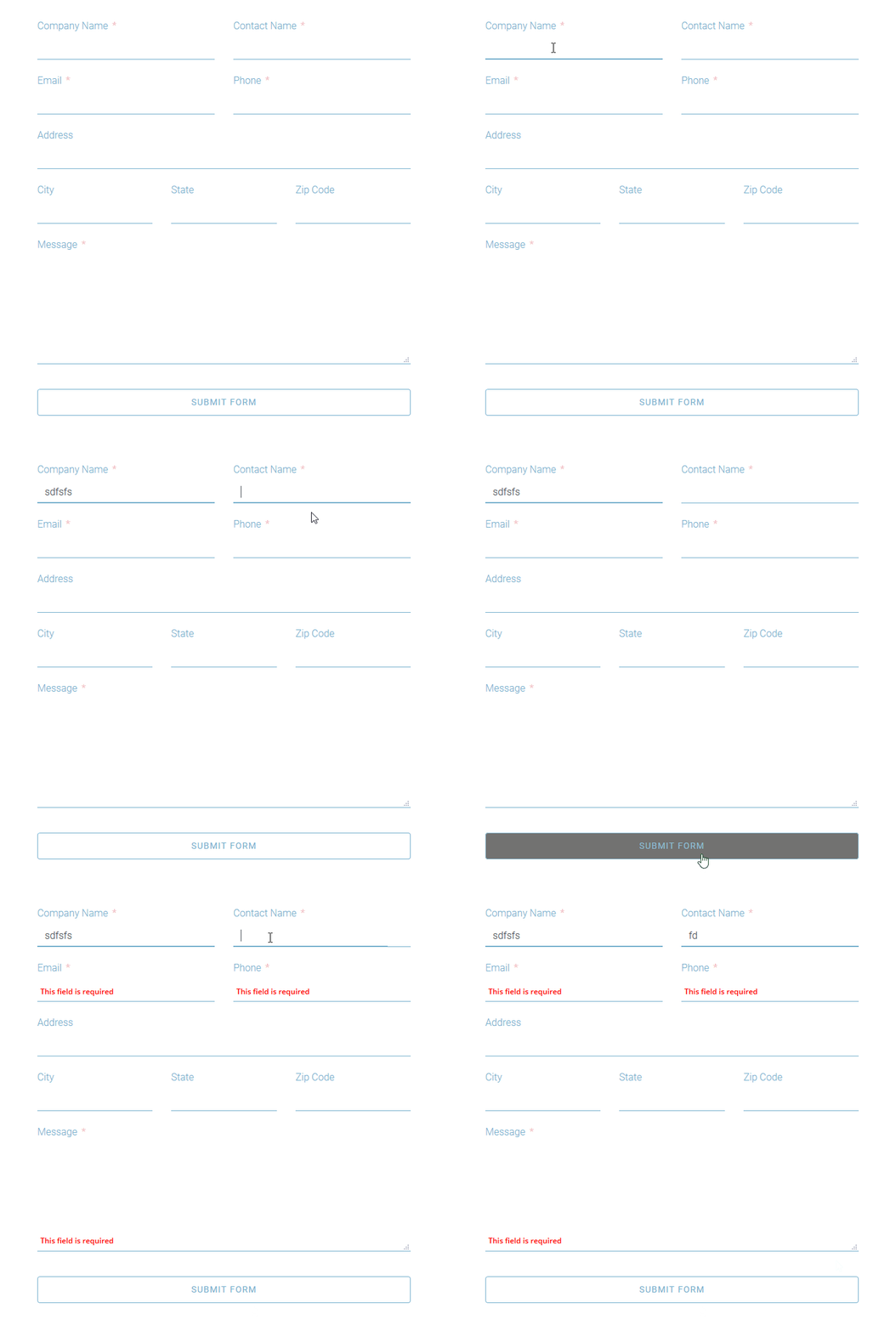
Here is an example of what the outcome looks like:

Fluent Forms animated on focus

To do this, you first have to add the class “animated_form_element” under the Advanced Options for each of the text/textarea’Ā  “Element Class” field such as below:


Next, we need to add some custom css and javascript to our form. We add it by going to the form’sĀ  “Settings & Integrations tab -> Custom CSS/JS” section.

For the CSS, it really depends on the look you are going for but for this example I wanted a bottom border to be shown on the input/textarea field regardless if it has focus or not. I also removed the default border radius on the input field as well. Here is the customer css to accomplish those things.

I use !important to be sure it overrides Fluent Forms default styles.

Next, let’s add the styles needed for the actual animation itself as well as modifying how the “This field is required.” is shown:

The error message for “This field is required” aka .text-danger is made switched to absoluteĀ  positioning and in this case has been set 5px from the bottom of the input fields container. Really, this could be different based on how you want the field to show on the form. You could use top instead for example. However, the .text-danger must be made absolute as we need it out of the document flow so it won’t create visual bugs with extra space in between the inputs border bottomĀ  and the border bottom that is used to create the animation.

Finally, we need to add some custom javascript to the form as well:


And that’s it for this example really.

You may notice I named the actual animation class name “animatedStyleName” which is generic. I did this because really you could take many of the different animations listed in the divi-menu-effects.css you can download from this site and replace the rules of animatedStyleName to do different types of animations. You have to subscribe to his newsletter in order to get the previously mentioned .css file that has the different animations. Some of the animation examples on that site require more work than what I described but I plan on writing an extension of this tutorial if it seems people might want it.

Can download the Fluent Form export example here . You may have to right click -> “save link as” for it to work.

Live example:

contactus


Background overlay on mobile for Oxygen builder

In Oxygen, you can apply a background image as well as an image overlay within the options. However, these settings can not be changed per break point. Why would you want it to change based on break point? If the foreground text is hard to read due to not enough contrast when in the mobile view(or any really) then you would want to increase the rgba transparency value. Here is what I do in oxygen to do this since the overlay can’t be changed per breakpoint.

First, I give the hero section a base class of .hero , in that class I only specify settings that will apply to all other hero sections layouts that are the same minus the variable background image be used. Then, I add an additional class that is only used and is specific to that page to dictate the background image and to handle the image overlay inĀ  media queries in css.

i.e.

So here we have 2 different types of hero layouts. #hero and #hero2 – neither of these contain the background or overlay settings. The classes like .v2-page is only used for that page and contains the background image specific for that page. The overlay for mobile is also handled.